
OIDC login for the clusters that won't let you set --oidc flags.
A reverse proxy in front of the API server. It validates bearer tokens from one or many OIDC issuers, then impersonates the user. Your RBAC stays authoritative on every request.
Authentication moves to the proxy. Authorization never moves.
- Point kubectl at the proxyClients get a kubeconfig whose server is the proxy. The API server's own endpoint keeps working for everyone else.
- The proxy validates the tokenSignature, issuer, audience and expiry are checked against cached JWKS. Non-OIDC tokens can pass through via TokenReview.
- Claims become a Kubernetes identityUsername, groups and extras are mapped by claim or by CEL expression, with a prefix per issuer.
- The API server decidesThe request is forwarded with the proxy's own ServiceAccount plus Impersonate headers. RBAC runs for the mapped user, and the audit log records them.
apiVersion: apiserver.config.k8s.io/v1
kind: AuthenticationConfiguration
jwt:
  - issuer:
      url: https://accounts.google.com
      audiences: [my-google-client]
    claimMappings:
      username: { claim: email, prefix: "google:" }
  - issuer:
      url: https://token.actions.githubusercontent.com
      audiences: [kube-oidc-proxy.example.com]
    claimMappings:
      username:
        expression: '"gha:" + claims.repository + ":" + claims.ref'
      groups:
expression: '["gha:org:" + claims.repository_owner]'More than a login. Identity, evidence and operations in one proxy.
Each capability is documented, tested end to end and exposed through the chart.
One proxy, many issuers, distinct identities
A Kubernetes AuthenticationConfiguration lists every issuer with its own audiences, CEL claim mappings and validation rules. The same proxy accepts tokens from all of them.
- Per-issuer username and group prefixes keep
alicefrom Google andalicefrom Dex apart. - Several audiences per issuer with
audienceMatchPolicy: MatchAny. - Readiness you choose: ready on the first issuer, or wait for all with
readinessRequireAllIssuers. - Refuses to start when two issuers share a host, so every log line and metric names its issuer unambiguously.
token from GoogleATTRIBUTE  VALUE
Username   google:alice@example.com
Groups     [google:platform system:authenticated]
token from GitHub ActionsATTRIBUTE VALUE
Username gha:rafpe/kube-oidc-proxy:refs/heads/main
Groups [gha:org:rafpe system:authenticated]# one record per change, not per scrape
{"event_type":"oidc.issuer.pending","issuer_name":"dex-b",
"issuer_state":"pending","pending_reason":"discovery",
"ready_issuers":2,"total_issuers":3}Short-lived CI tokens become Kubernetes users
A workflow's OIDC token carries the repository, ref and environment. CEL expressions turn those claims into a username, groups and audit extras, so RBAC can be as narrow as one repo on one branch.
- No deploy keys or long-lived kubeconfigs in CI secrets.
- Trust boundary by immutable owner ID, then tiers by claim: a protected branch gets more than a pull request.
- Hard gates with validation rules, for example rejecting tokens from pull requests.
- Recipes for GitHub Actions, GitLab CI, TeamCity, Google service accounts and private issuers.
claimValidationRules:
  # Trust boundary first: only this owner's repositories, by immutable ID.
  - expression: 'claims.repository_owner_id == "1234567"'
    message: token is not from a trusted organisation
claimMappings:
  username:
    expression: '"gha:" + claims.repository + ":" + claims.ref'
  groups:
    # The release tier needs a protected main branch, not just a branch named main.
    expression: >-
      claims.ref == "refs/heads/main" && claims.ref_protected == "true"
        ? ["gha:org:" + claims.repository_owner, "gha:tier:release"]
        : ["gha:org:" + claims.repository_owner]
  extra:
    - key: gha.example.com/run_id
      valueExpression: claims.run_id
userValidationRules:
  - expression: '!user.username.contains(":refs/pull/")'
    message: pull request tokens are not allowed
Know what the proxy is doing before someone asks
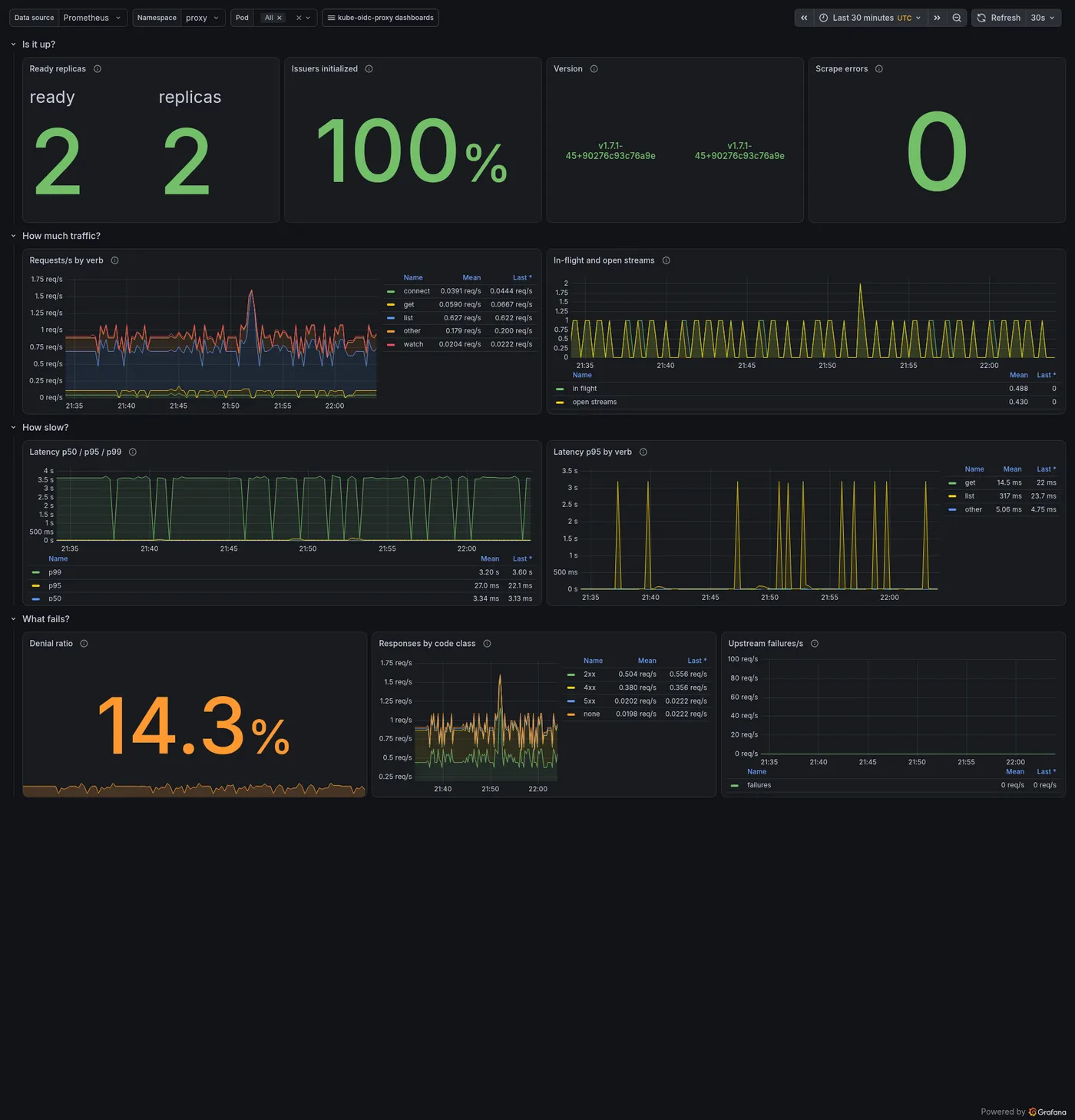
An opt-in Prometheus endpoint on its own listener. Every label value comes from a closed set, so no identity, path or client-chosen value ever becomes a series.
- Authentication attempts by method and outcome; access decisions by reason.
- Request latency histogram, in-flight gauge and open long-running streams.
- TokenReview and SubjectAccessReview calls, latency and cache hit ratio.
- Three Grafana dashboards shipped by the chart: overview, security and identity, capacity.
kube_oidc_proxy_authentication_attempts_total{auth_method="oidc",outcome="accepted"} 1842
kube_oidc_proxy_authentication_attempts_total{auth_method="oidc",outcome="rejected"} 7
kube_oidc_proxy_access_decisions_total{auth_method="oidc",decision="deny",reason="impersonation_denied"} 2
kube_oidc_proxy_request_duration_seconds_bucket{le="0.05"} 1799
kube_oidc_proxy_cache_lookups_total{cache="tokenreview",result="hit"} 913
kube_oidc_proxy_long_running_requests 4
kube_oidc_proxy_oidc_issuer_initialized{issuer_name="dex-b"} 1
kube_oidc_proxy_ready 1metrics:
enabled: true
serviceMonitor: { enabled: true }
dashboards: { enabled: true }Who did what, before and after impersonation
Every request can leave two audit events: the proxy's, with the identity your claim mappings produced, and the API server's, with the authorization decision. The same ID is on both, and on every log record in between.
- One structured JSON log stream with a frozen
event_typecontract for alerts and SIEM queries. - Security denials at default verbosity as
AuFailrecords with a reason. - An optional Kubernetes audit log of the proxy's own, with your audit policy.
- Worked example for shipping logs and audit events to Kinesis.
{"time":"2026-09-04T10:53:24.615Z","level":"INFO","msg":"access decision",
 "component":"request","event_type":"request.access.decided",
 "request_id":"7f1a9c1e-6a2b-4a1f-9f0e-3d9d1c2b5a04","event":"AuSuccess",
 "auth_method":"oidc","issuer_name":"corp",
 "k8s_verb":"list","k8s_resource":"pods","k8s_namespace":"default",
 "decision":"allow","inbound_user":"alice@example.com",
"inbound_groups":["platform-admins","system:authenticated"]}{"auditID":"7f1a9c1e-6a2b-4a1f-9f0e-3d9d1c2b5a04",
"user":{"username":"system:serviceaccount:kube-oidc-proxy:kube-oidc-proxy"},
"impersonatedUser":{"username":"alice@example.com","groups":["platform-admins"]},
"verb":"list","objectRef":{"resource":"pods","namespace":"default"},
"responseStatus":{"code":200}}Production defaults, not a starting point
The chart is published as a signed OCI artifact to ghcr.io and listed on Artifact Hub. Each feature is one value away.
- Locked-down SecurityContext, distroless image, PodDisruptionBudget for multiple replicas.
- Issuer configuration from an existing Secret, for single and multi-issuer setups.
- Flexible TLS: cert-manager, your own Secret, or terminate at the ingress.
- Metrics Service, ServiceMonitor, dashboards and a NetworkPolicy for the metrics port.
- RBAC rendered from your claim mappings, including
userextrasfor every extra key.
replicaCount: 2
podDisruptionBudget: { enabled: true, minAvailable: 1 }
authenticationConfig:
  existingSecret: kube-oidc-proxy-issuers   # managed outside Helm
tls:
  certManager: true
  selfSigned: false
  issuerName: internal-ca
metrics:
  enabled: true
networkPolicy:
  enabled: true
  metrics:
    from: [{ namespaceSelector: { matchLabels: { kubernetes.io/metadata.name: monitoring } } }]
rbac:
userExtras: [gha.example.com/run_id]cosign verify ghcr.io/rafpe/charts/kube-oidc-proxy:1.8.1 \
--certificate-identity-regexp '^https://github.com/RafPe/kube-oidc-proxy/' \
--certificate-oidc-issuer https://token.actions.githubusercontent.comInstall the chart, ask the cluster who you are.
A smoke test, not a production install. The full first installation with ingress, TLS and RBAC is in Getting started.
kubectl and Helm 3 or newer.$ID_TOKEN.ATTRIBUTE VALUE Username google:alice@example.com Groups [system:authenticated]
# install from the signed OCI chart
helm install kube-oidc-proxy oci://ghcr.io/rafpe/charts/kube-oidc-proxy \
  --namespace kube-oidc-proxy --create-namespace \
  --set oidc.clientId=<client-id> \
  --set oidc.issuerUrl=https://<issuer-url> \
  --set oidc.usernameClaim=email \
  --set oidc.usernamePrefix=google:

# verify: port-forward and ask the cluster who you are
kubectl -n kube-oidc-proxy port-forward svc/kube-oidc-proxy 8443:443 &
kubectl --server=https://127.0.0.1:8443 --insecure-skip-tls-verify \
  --token="$ID_TOKEN" auth whoami