
Metrics
kube-oidc-proxy can serve Prometheus metrics on a dedicated listener. It is
off by default: pass --metrics-bind-address=host:port (or set
metrics.enabled: true or metrics.serviceMonitor.enabled: true in the chart) and the proxy answers GET and
HEAD /metrics on that address over plain HTTP. Nothing else is served there:
any other method on that path is 405 with an Allow header and every other
path is 404 — no pprof, no index, no reset.
- Enable ServiceMonitor scraping
- What the endpoint reveals
- Where the metrics attach
- Catalogue
- Label values
- Buckets
- Compatibility
- Worked queries
- Dashboards
- Exposure and hardening
- See also
Enable ServiceMonitor scraping
Section titled “Enable ServiceMonitor scraping”For a cluster with Prometheus Operator and its ServiceMonitor CRD installed, merge this into your normal authentication values:
metrics: serviceMonitor: enabled: true additionalLabels: release: monitoring interval: 30s scrapeTimeout: 10sThe single switch enables the HTTP metrics listener, dedicated ClusterIP Service
and ServiceMonitor. metrics.enabled remains available for standalone scraping;
it defaults to false but does not override an enabled ServiceMonitor. No monitor
or listener is enabled by default. PodMonitor and ServiceMonitor remain mutually
exclusive.
Replace monitoring with the label value your Prometheus selects. With standard
kube-prometheus-stack defaults this is its Helm release name, not necessarily its
namespace. Inspect the installed Prometheus resource rather than assuming a
label. Its serviceMonitorSelector must match the monitor’s metadata labels,
and serviceMonitorNamespaceSelector must include the monitor’s namespace.
The monitor defaults to the application release namespace. To place it alongside
Prometheus, set metrics.serviceMonitor.namespace: monitoring; that namespace
must already exist. Its Service selector still targets the application namespace.
Prometheus needs permission to discover Services and endpoints there. The proxy’s
ServiceAccount needs no new permissions.
The chart renders enabled monitors during offline Helm/GitOps rendering too. Install the CRD first: an enabled monitor on a cluster without it will fail to install. See the Operator troubleshooting guide.
To disable all metrics, set both metrics.serviceMonitor.enabled: false and
metrics.enabled: false; also disable optional dashboards, rules, PodMonitor
and metrics NetworkPolicy if you enabled them. To remove only Operator discovery while retaining the
listener, set metrics.enabled: true and the monitor switch to false. With
standalone metrics enabled, changing the monitor switch does not change the
Deployment. Disabling a listener implicitly enabled by the monitor does roll pods.
If no target appears, check the Prometheus monitor label/namespace selectors,
then the ServiceMonitor Service selector and named Service port. If the target
is down, check pod readiness, listener address and network access. ServiceMonitor
scraping needs a pod-reachable bind address; 127.0.0.1 only serves local sidecars.
The current listener is HTTP: setting the monitor’s scheme to HTTPS does not add
TLS to the server. Use the network policy guidance to
restrict access; a ClusterIP alone is not access control.
For a live check with pinned Prometheus Operator dependencies, the metrics demo deploys this one-switch configuration and checks that every ready proxy pod is scraped by Prometheus.
What the endpoint reveals
Section titled “What the endpoint reveals”Traffic shape and health, never who did what. No label ever carries a
username, group, UID, request id, request path, HTTP method, resource, API
group, issuer URL, peer address or User-Agent. Every label value is projected
onto a closed set before it reaches a collector, so a client cannot create a
series by sending an unusual request: an unknown verb, scope, status or reason
becomes other. That projection is a security control, the same class of
defence as the fix for CVE-2022-21698 (an unbounded method label in
promhttp). The “who” lives in the audit log, behind different
access controls.
The go_* and process_* families come from the Prometheus client library
and are documented by it; the proxy passes them through unchanged.
Where the metrics attach
Section titled “Where the metrics attach”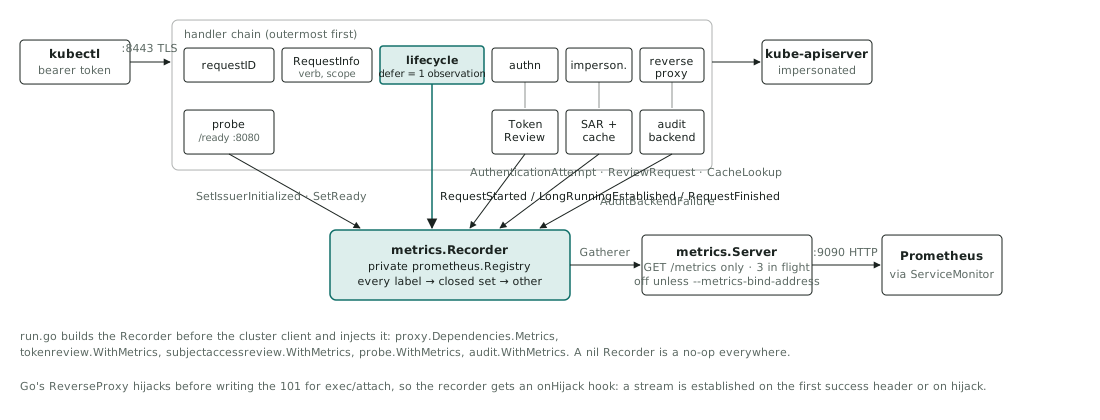
The whole request side is observed in one function: the deferred block of the
lifecycle filter (pkg/proxy/lifecycle.go), which already classifies status,
termination, hijack and panic once per request. The metric and the
request.response.completed record therefore carry the same values by
construction. Everything else reports through the same recorder, which is nil,
and a no-op, when metrics are off.
| Family | Observed at | Hook |
|---|---|---|
requests_total, request_duration_seconds, requests_in_flight, long_running_requests | the lifecycle filter’s deferred block | RequestStarted, LongRunningEstablished (first success header, or hijack), RequestFinished |
authentication_attempts_total | the authentication filter and the TokenReview fallback | AuthenticationAttempt |
access_decisions_total | wherever the one access record is written | AccessDecision, through recordDecision |
review_requests_total, review_request_duration_seconds | the single Create call of each review client | ReviewRequest |
cache_lookups_total | the two review caches | CacheLookup |
oidc_issuer_initialized, ready | the readiness probe’s state transitions | SetIssuerInitialized, SetReady |
audit_backend_failures_total | the audit backend’s start and shutdown | AuditBackendFailure |
Catalogue
Section titled “Catalogue”Every first-party family, generated from the catalogue in pkg/metrics.
make metricdoc regenerates the table and CI fails on a diff. Stability is
also the prefix of each family’s help string on the wire: [STABLE] families
keep their name, type and labels across releases; [ALPHA] families may
change with a changelog entry.
| name | type | labels | stability | help |
|---|---|---|---|---|
kube_oidc_proxy_build_info | gauge | version, revision, go_version | STABLE | Build information; always 1. |
kube_oidc_proxy_requests_total | counter | k8s_verb, scope, code, termination | STABLE | Completed requests by Kubernetes verb, scope, HTTP status code and how the exchange ended. |
kube_oidc_proxy_request_duration_seconds | histogram | k8s_verb, scope | STABLE | Latency of completed requests in seconds, excluding long-running (watch, exec, attach, portforward, logs, proxy) and hijacked requests. |
kube_oidc_proxy_requests_in_flight | gauge | none | STABLE | Requests currently inside the handler chain. |
kube_oidc_proxy_long_running_requests | gauge | k8s_verb, scope | STABLE | Long-running requests whose response has started (headers written or connection hijacked) and not yet ended. |
kube_oidc_proxy_authentication_attempts_total | counter | auth_method, outcome | STABLE | Authentication attempts by method and outcome, before the identity and authorization checks that follow. |
kube_oidc_proxy_access_decisions_total | counter | auth_method, decision, reason | STABLE | Final access decisions; reason is empty on allow. |
kube_oidc_proxy_review_requests_total | counter | review, outcome | STABLE | TokenReview and SubjectAccessReview API calls actually issued to the API server, by outcome. |
kube_oidc_proxy_review_request_duration_seconds | histogram | review, outcome | STABLE | Latency of review API calls in seconds. |
kube_oidc_proxy_cache_lookups_total | counter | cache, result | STABLE | Review cache lookups by cache and result. |
kube_oidc_proxy_oidc_issuer_initialized | gauge | issuer_name | STABLE | 1 once the issuer’s authenticator has fetched its JWKS. Reports initialization, not ongoing issuer availability. |
kube_oidc_proxy_ready | gauge | none | STABLE | 1 once the proxy is serving and readiness has latched. |
kube_oidc_proxy_audit_backend_failures_total | counter | operation | ALPHA | Audit backend failures observable at start and shutdown. Asynchronous delivery failures are not included. |
Label values
Section titled “Label values”Every label is a closed set. The sets repeat the vocabularies the log records use, so a log query and a PromQL query select the same thing.
| Label | Values |
|---|---|
k8s_verb | get, list, watch, create, update, patch, delete, deletecollection, proxy, connect, other, lowercase. A request to a streaming subresource (exec, attach, portforward, log, proxy) is connect whichever method carried it, the normalisation kube-apiserver applies in its own request metrics (which are uppercase and also distinguish APPLY). On a non-resource path the resolver’s verb is the raw HTTP method, so only GET maps to a value (get) and everything else is other. |
scope | cluster, namespace, resource, none. none is a non-resource request (kube-apiserver renders that as an empty label; the proxy never emits an empty value because Prometheus cannot tell it from an absent label). |
code | The HTTP status as a number, bounded by the IANA registry; none when no status was written (a hijacked connection, a dropped one); other for a code outside the registry. Note the log field is http_status; the metric label follows the code convention of kube-apiserver and promhttp so existing dashboards apply. |
termination | normal, hijacked, client_cancel, panic, upstream_timeout, upstream_reset, proxy_error. |
auth_method | oidc, tokenreview, none. |
outcome (authentication) | accepted, rejected, error. An OIDC failure then a successful TokenReview is two attempts and one decision. |
decision | allow, deny. |
reason | Empty on allow; on deny one of unauthorized, reserved_identity, no_username_claim, impersonation_denied, too_many_impersonation_values, client_canceled, internal_error, upstream_error, authentication_dependency_error. |
review | tokenreview, sar. |
outcome (review) | allow, deny, timeout, canceled, error, classified from the API call itself. For a TokenReview, allow means authenticated. |
cache / result | tokenreview or sar; hit, miss, bypass. For sar, bypass is a review spec too large to cache or a cache disabled by a zero TTL. For tokenreview only hit and miss occur: with both TTLs at zero the cache layer is not constructed and no lookup is counted. |
issuer_name | The configured issuer’s host, as in the log records. Never the URL. Two issuers sharing a host are refused at startup. |
operation | run, shutdown. |
Buckets
Section titled “Buckets”kube_oidc_proxy_request_duration_seconds uses kube-apiserver’s STABLE
apiserver_request_duration_seconds boundaries verbatim: 0.005, 0.025, 0.05,
0.1, 0.2, 0.4, 0.6, 0.8, 1, 1.25, 1.5, 2, 3, 4, 5, 6, 8, 10, 15, 20, 30, 45, 60
seconds. Proxy latency is proxy overhead plus API server latency; identical
boundaries let the two quantiles sit on one panel and be compared honestly,
because histogram_quantile interpolates within a bucket.
Long-running requests (watch, exec, attach, portforward, logs
including a plain kubectl logs, and proxy) are never observed in that
histogram. They are counted in kube_oidc_proxy_long_running_requests from the
moment their response starts (headers written, or the connection hijacked for
an upgrade) until they end. A watch refused with 401 never starts a stream and
never touches the gauge.
kube_oidc_proxy_review_request_duration_seconds uses 0.0001, 0.0003, 0.001,
0.003, 0.01, 0.03, 0.1, 0.3, 1, 5, 10, 15, 30 seconds: one API round trip with
a 10s default timeout.
Compatibility
Section titled “Compatibility”- Families, types, label names and their value sets are append-only. A
[STABLE]family is never renamed or relabelled in place; a change ships as a new family with a documented overlap. - A new label value may be added to a set in any release and is not a breaking change.
- The classic histogram bucket boundaries are part of the contract.
- The
go_*,process_*andpromhttp_*families belong to the client library; a library upgrade may change them and is reviewed as a dependency change. - Native histograms and exemplars are not exposed. OpenMetrics negotiation is
off because it changes the
lelabel formatting and therefore series identity; the handler still negotiates the Prometheus text or protobuf encoding from the scraper’sAcceptheader, as promhttp does. kube_oidc_proxy_audit_backend_failures_total{operation="shutdown"}is incremented from a pre-shutdown hook. The metrics listener is stopped only after those hooks return, so the series is observable — but only to a scrape that lands inside the drain window, which is shorter than any ordinary scrape interval. Treat theaudit.flush.failedlog record as the operational signal for that case and the counter as best-effort corroboration.- Not covered by this catalogue and deliberately so: request and response
sizes, TLS handshake failures on the proxy listener (they end before HTTP
handling), and transport failures inside an upgraded stream after the
hijack. Upstream transport failures are visible as
kube_oidc_proxy_requests_total{termination=~"upstream_.*|proxy_error"}.
Worked queries
Section titled “Worked queries”Requests per second by verb:
sum by (k8s_verb) (rate(kube_oidc_proxy_requests_total[5m]))Denials per second by reason (the log equivalent is the denials query):
sum by (reason) (rate(kube_oidc_proxy_access_decisions_total{decision="deny"}[5m]))Streams open right now, the memory dimension from capacity and sizing:
sum(kube_oidc_proxy_long_running_requests)p99 latency for short requests, next to the API server’s own:
histogram_quantile(0.99, sum by (le) (rate(kube_oidc_proxy_request_duration_seconds_bucket[5m])))histogram_quantile(0.99, sum by (le) (rate(apiserver_request_duration_seconds_bucket{verb!~"WATCH|CONNECT"}[5m])))Review cache hit ratio:
sum(rate(kube_oidc_proxy_cache_lookups_total{result="hit"}[5m])) / sum(rate(kube_oidc_proxy_cache_lookups_total[5m]))Issuers not initialized:
kube_oidc_proxy_oidc_issuer_initialized == 0Dashboards
Section titled “Dashboards”The chart ships three Grafana dashboards (metrics.dashboards.enabled: true)
as a ConfigMap the Grafana sidecar loads; kube-prometheus-stack picks them up
with no further configuration. Each answers a different set of questions.
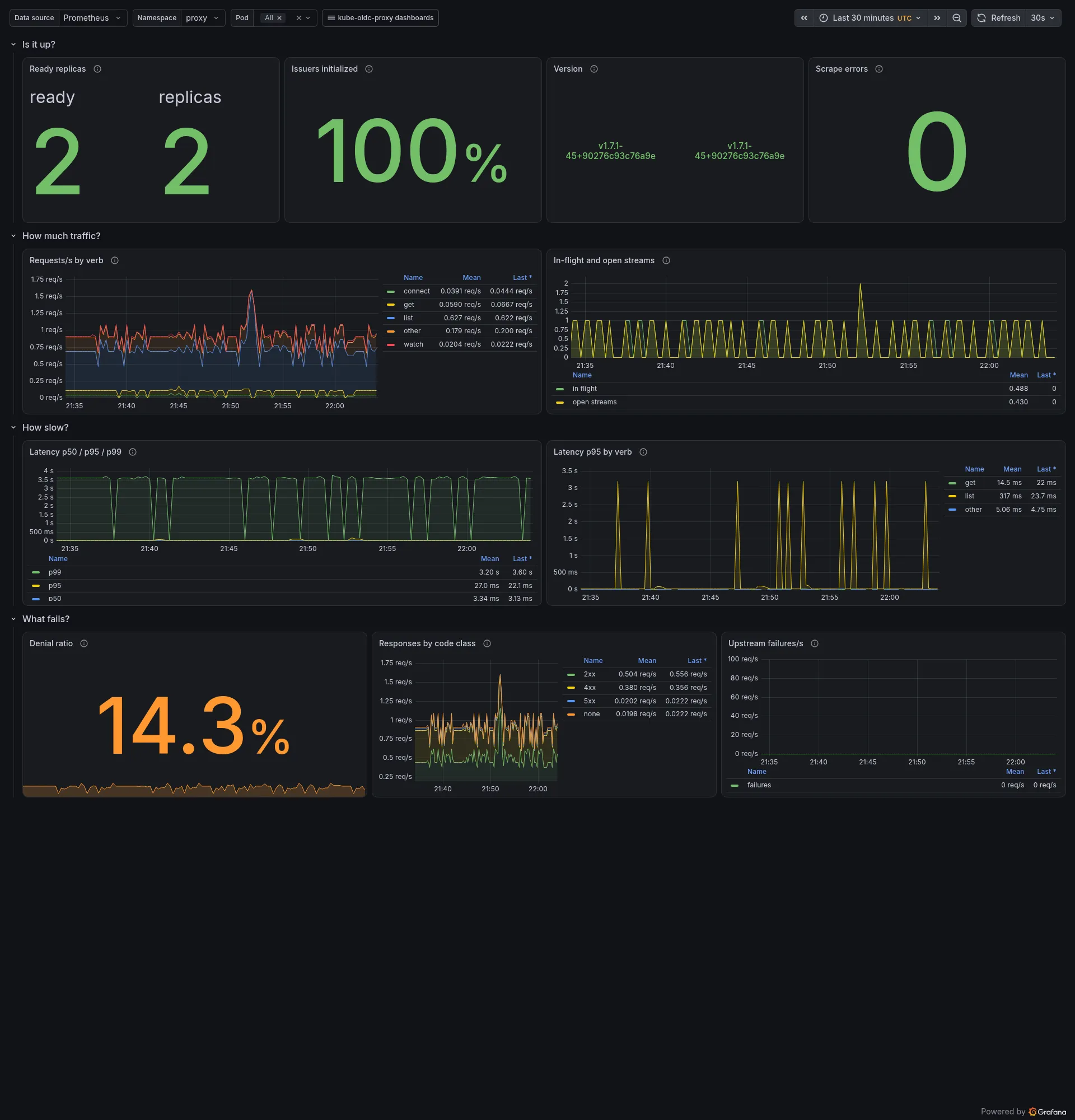
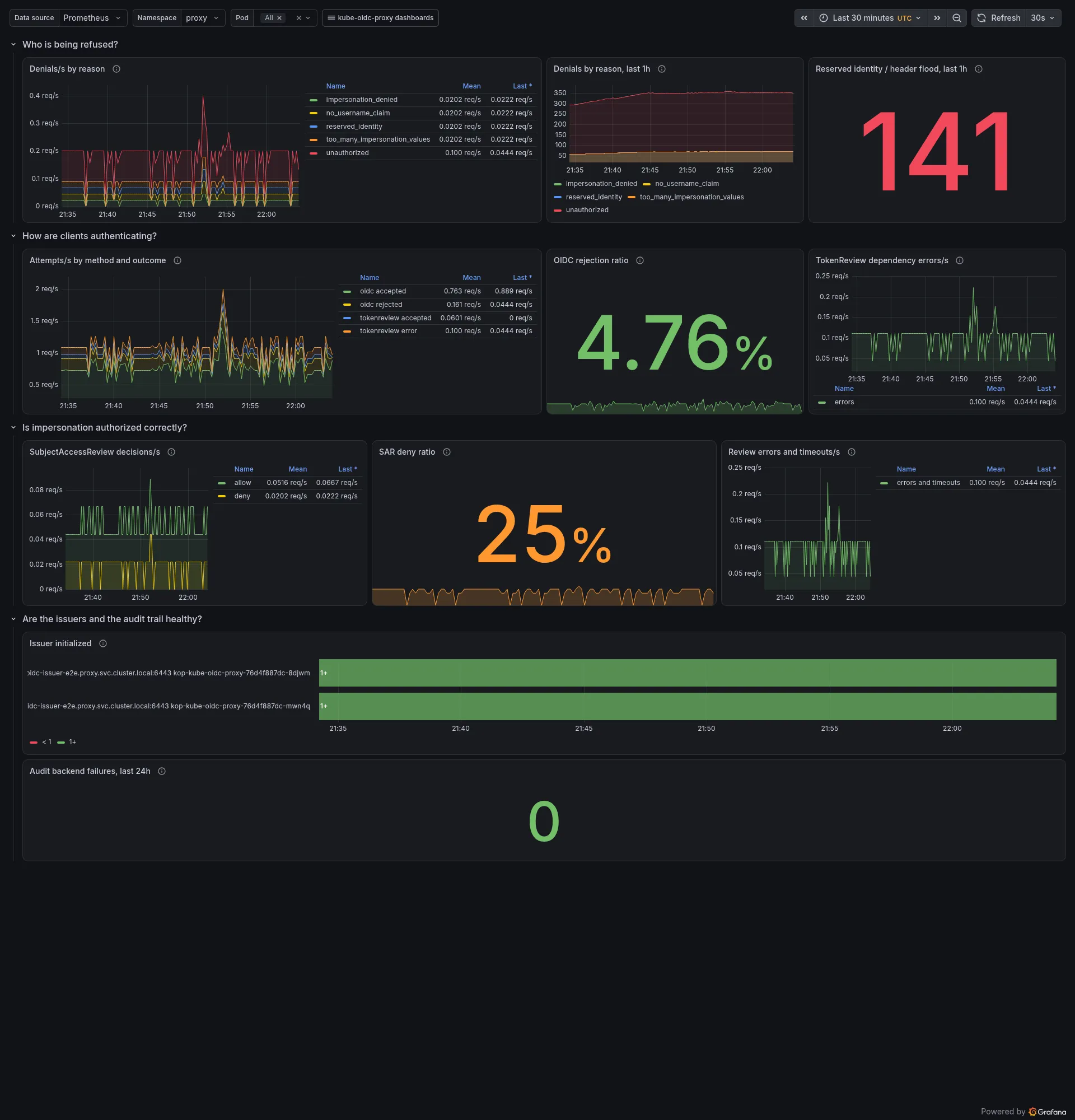
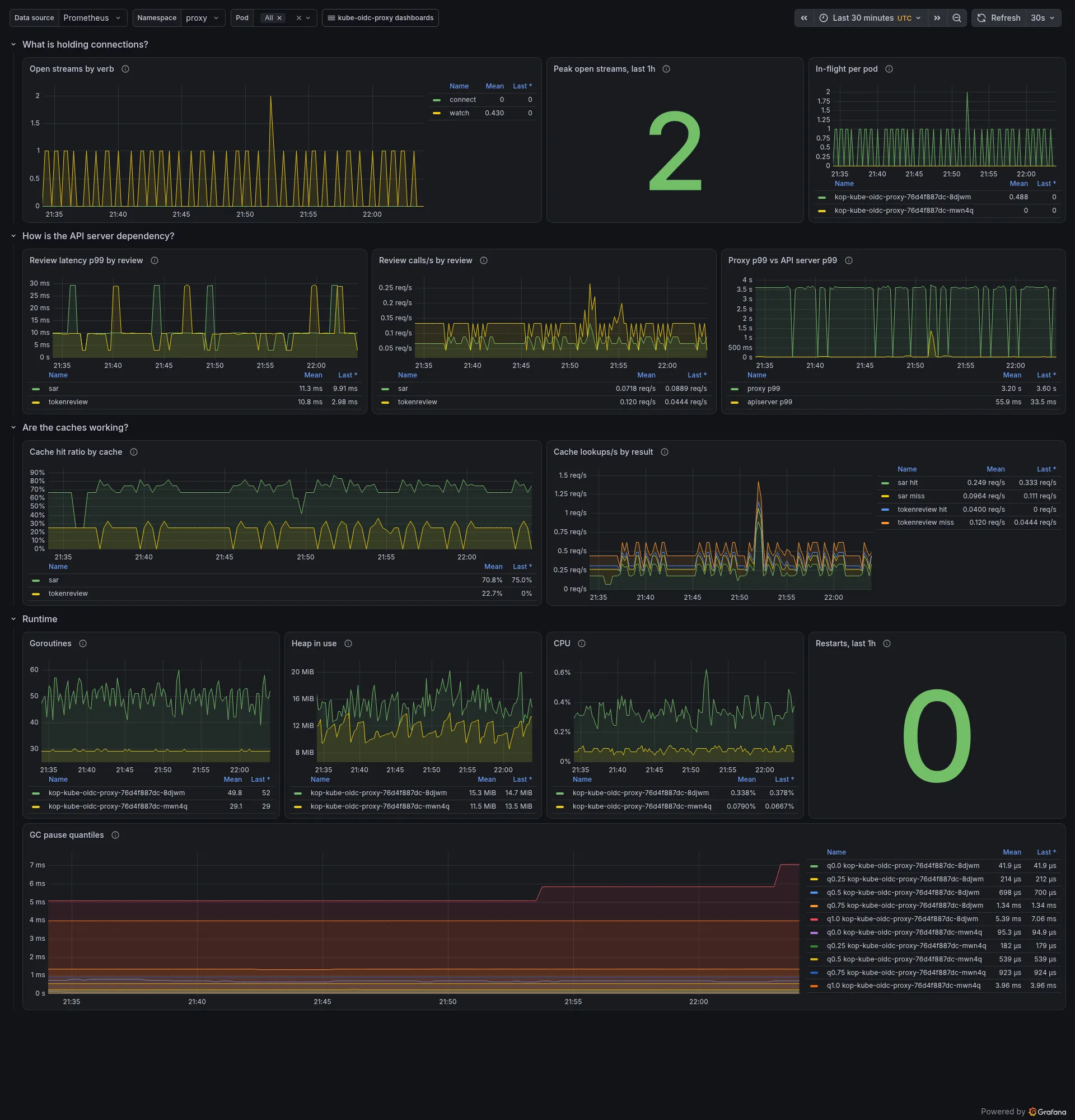
The screenshots come from the kind demo with
the load generator running. Five panels count things a healthy
proxy is not expected to be doing - upstream failures, TokenReview dependency
errors, review errors and timeouts, audit backend failures, reserved-identity
and header-flood attempts. A counter child that has never been incremented has
no series at all, so those five queries fall back to vector(0) and read a
flat zero rather than “No data”.
Two of the five are not pure dependency-health signals, and their panels say
so. authentication_attempts_total{auth_method="tokenreview",outcome="error"}
and review_requests_total{outcome="error"} count every TokenReview that came
back with no verdict, and kube-apiserver sets status.error on a bearer token
it cannot parse - so a client presenting a malformed token lights both panels
exactly as an unreachable API server does, and the proxy then refuses that
request as an ordinary unauthorized denial. A non-zero value means “no verdict
was reached”, not “the dependency is broken”; the authn.tokenreview.failed
log records, or the API server’s own error rate, are what separate a bad
client from a broken dependency. Each of the five aggregates to a single series first - sum(rate(...))
for the three rate panels, sum(increase(...)) for the two counting panels -
and then writes the fallback as a plain or vector(0). That works because
vector(0) has an empty label set and so does the result of a sum() with no
by: or drops its right-hand side when the label set already appears on the
left, which it does the moment there is any real data. None of the five groups
by a label, so none needs or on() label_replace(...), and each names its
series with a literal legendFormat - in the order the five are named above,
“failures”, “errors”, “errors and timeouts”, “failures” and “attempts” -
rather than letting Grafana label the fallback “Value”.
Three ratio panels need the same fallback for the same reason: the overview’s
denial ratio, and the security dashboard’s OIDC rejection ratio and SAR deny
ratio. Their numerator selects the denied or rejected outcome, which has no
series until something is denied, while the denominator counts every outcome
and has plenty - so an unguarded division matches nothing and the panel reads
“No data” on a deployment that is refusing nobody. Each numerator is therefore
written (sum(rate(...)) or vector(0)). It reads 0 against live traffic, and
it still reads “No data” when the denominator is absent, which is the right
answer: with no traffic at all there is no share to take. Grouped ratios keep
no fallback - an unlabelled zero would draw as an extra series beside the real
ones rather than fill a gap - and hack/verify-chart-dashboards.sh requires
the fallback on exactly the ungrouped ones.
The demo does not fake any of them: in the screenshots below
the upstream-failure panel reads zero because the API server never failed to
answer, which is what a healthy deployment looks like. The two TokenReview
error panels are not zero there, and that is the point of the paragraph above:
one traffic kind presents a bearer token no authenticator claims, kube-apiserver
answers it with status.error, and the panels count it exactly as they would
count an unreachable API server. The proxy still refuses that request as an
ordinary 401.
The p99 latency in those screenshots sits near three seconds, and that is the
upstream, not the proxy: one of the demo’s traffic kinds lists pods at a
resourceVersion the API server will never observe, and the API server takes
about three seconds to answer it 504. The proxy forwards that request and
records its full duration, which is exactly what the panel is for - it
measures what a client waited, and a slow upstream is the usual reason. The
scenario runs at most once per rotation, so it lifts p99 without distorting
the rest.
Overview (kube-oidc-proxy-overview)
Section titled “Overview (kube-oidc-proxy-overview)”For whoever is on call: is it up, how much traffic, how slow, what fails. Ready and issuer state, request rate by verb, in-flight and open streams, p50/p95/p99 latency against the same buckets as the API server, denial ratio, responses by code class, upstream failures.
Security and identity (kube-oidc-proxy-security)
Section titled “Security and identity (kube-oidc-proxy-security)”For the security engineer: who is being refused and why, how clients authenticate, whether impersonation is authorized as intended, whether the review dependencies are healthy. Denials by reason, reserved-identity and header-flood attempts, authentication attempts by method and outcome, SubjectAccessReview allow/deny, review errors and timeouts, issuer state, audit backend failures.
Capacity and dependencies (kube-oidc-proxy-capacity)
Section titled “Capacity and dependencies (kube-oidc-proxy-capacity)”For the platform engineer: what holds connections and memory, how the API server dependency behaves, whether the caches are earning their keep, runtime health. Open streams by verb and their peak, review latency and call rate, proxy p99 next to the API server’s, cache hit ratio, goroutines, heap, GC, CPU, restarts.
Exposure and hardening
Section titled “Exposure and hardening”- The listener is plain HTTP. Any pod that can reach the proxy pod’s IP on
that port can read the metrics unless a NetworkPolicy restricts it. The
chart’s
networkPolicy.enabledrenders one allowing only the peers you list innetworkPolicy.metrics.from. Bind127.0.0.1:<port>viametrics.bindAddressinstead when a sidecar in the same pod does the scraping. - The chart puts the port on a dedicated ClusterIP Service,
<release>-metrics, never on the main Service, soservice.type: LoadBalancercannot expose it. - The handler bounds concurrent scrapes (3 in flight, 10s timeout) and the
server bounds header and idle time; set
sampleLimitandtargetLimiton the ServiceMonitor as defence in depth for Prometheus itself. - Do not put the metrics port on the proxy’s TLS listener or on the readiness port: the former fronts blanket impersonation rights, the latter is in the kubelet’s path.
- TLS on the listener and delegated TokenReview/SubjectAccessReview authorization of scrapes are planned as a later, additive step.
See also
Section titled “See also”- Configuration:
--metrics-bind-address - Chart values
metrics.* - Operations: capacity and sizing
- Logging reference, which the label vocabularies mirror
- CONTRIBUTING